Diwali is a perfect occasion to share colorful photographs, traditional outfits, festive decorations, and memorable moments with friends and family. In 2026, AI-assisted photo editing offers another way to create personalized Diwali images without arranging a professional photoshoot. With carefully written Diwali 2026 AI photo editing prompts for Gemini AI, you can explore traditional portraits, glamorous festive looks, diya photography, and creative night scenes.
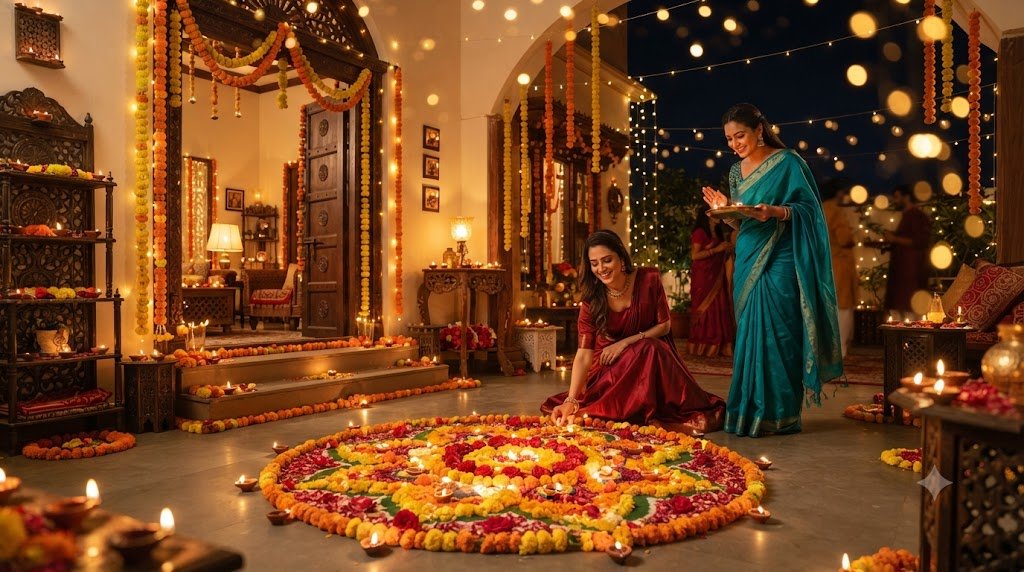
Google Gemini’s image features can help users create or edit images from written instructions, depending on the features available to their accounts. The key is to describe your idea clearly. Instead of requesting only a viral Diwali photo, explain the clothing, setting, lighting, pose, and photographic style you want.
This article shares 10 detailed prompts that you can customize for your own festive images. Whether you want a traditional portrait, an Instagram-ready photo, or a cinematic Diwali night scene, these prompts can help you get started.
Why Use Gemini AI for Diwali Photo Editing?
Traditional festival photography often requires planning, decorations, lighting, and a suitable location. AI-assisted editing provides another option for people who want to experiment with different visual styles.
With a detailed prompt, you can ask for a festive background, change the atmosphere of a photograph, explore different outfit ideas, or create a new composition. Results vary, so it is important to review the image and make adjustments when needed.
Some popular Diwali image ideas include:
- Traditional Indian festive portraits.
- Diya and rangoli photography.
- Glamorous ethnic fashion looks.
- Couple portraits with festive lighting.
- Nighttime photographs with fairy lights.
- Family celebration scenes.
- Minimalist festive profile pictures.
- Cinematic portraits with warm golden light.
How to Create Diwali AI Images With Gemini
Follow these steps to try the prompts in this article.
- Open Google Gemini and sign in.
- Select an available image-generation or image-editing feature.
- Upload your photo if you want to edit an existing image and the feature supports uploads.
- Copy a prompt from this article.
- Paste it into Gemini and adjust the details to match your preferences.
- Review the generated image and request corrections if necessary.
- Save the result and use it according to your intended purpose and the applicable service terms.
For an existing portrait, describe the changes you want while clearly identifying the features you want to retain. For example, you might want a different background while keeping your face, expression, and general appearance unchanged.
10 Diwali 2026 AI Photo Editing Prompts for Gemini AI
1. Viral Traditional Diwali Portrait
Prompt:
"Edit the uploaded photo into a realistic Diwali 2026 portrait. Dress the person in elegant traditional Indian festive clothing with detailed fabric texture and tasteful accessories. Create a beautiful background featuring clay diyas, marigold garlands, colorful rangoli, and warm decorative lights. Use realistic portrait photography, natural skin texture, soft golden lighting, and balanced colors. Preserve the person's original facial features and recognizable appearance as closely as possible. Avoid artificial skin smoothing and exaggerated effects."This prompt is suitable for a classic festive image. It combines familiar Diwali decorations with traditional fashion and natural-looking lighting.
2. Glamorous Diwali Fashion Edit
Prompt:
"Create a premium festive fashion photograph based on the uploaded reference image. Style the person in a sophisticated Indian festive outfit with realistic embroidery, natural fabric folds, and elegant accessories. Place them in a stylish interior decorated with warm lights, brass lamps, and subtle floral arrangements. Use professional fashion photography, realistic shadows, accurate skin tones, and a confident but natural pose. Preserve the person's original face and body proportions."Use this prompt if you want an elegant image inspired by a fashion photoshoot. You can specify a silk saree, embroidered kurta, lehenga, or another outfit.
3. Diwali Instagram Portrait
Prompt:
"Transform the reference image into a polished, realistic Diwali portrait suitable for a social media post. Show the person wearing attractive traditional clothing in front of a festive background with glowing diyas and warm fairy lights. Use a clean composition, natural facial expression, realistic skin texture, and soft background blur. Keep the face clearly visible and preserve the person's original facial identity as closely as possible. Use a vertical portrait composition with enough space around the subject for easy cropping."This prompt is useful when you want an image that remains clear on a mobile screen. Remember to review the final crop before uploading it.
4. Diwali Couple Photo Editing
Prompt:
"Create a romantic but natural Diwali couple portrait using the uploaded reference photos, if supported. Show the couple wearing coordinated traditional Indian outfits in a beautifully decorated setting with glowing diyas, flowers, and warm lights. Use comfortable poses, natural expressions, realistic clothing textures, and professional portrait photography. Preserve both people's recognizable facial features as closely as possible. Avoid changing their identities, merging facial features, or creating unnatural hands."This option is suitable for couples who want a coordinated festive photograph. If you use two reference photos, make sure the instructions clearly distinguish each person.
5. Diwali Night Photography Edit
Prompt:
"Edit the reference image into a photorealistic Diwali night portrait. Place the person in an outdoor festive setting with warm fairy lights, clay diyas, and subtle decorations in the background. Use realistic low-light photography, soft golden highlights, gentle bokeh, and natural shadows. Keep the subject well-lit and clearly visible. Preserve the original face, natural skin texture, and body proportions. Avoid excessive glow, unrealistic light effects, and artificial facial changes."Night scenes can look attractive when the subject remains clearly visible against the darker background. This prompt focuses on balanced lighting rather than overwhelming effects.
6. Diwali Saree Look
Prompt:
"Create a realistic Diwali fashion portrait based on the uploaded reference photo. Dress the person in an elegant traditional Indian saree with detailed fabric texture, natural pleats, a neatly arranged pallu, and coordinated jewellery. Place them near a decorated doorway with marigold flowers and glowing diyas. Use warm natural lighting, realistic skin texture, and professional portrait photography. Preserve the original face and avoid changing facial proportions."This prompt is suitable for anyone who wants to explore a traditional saree look for Diwali. You can customize the saree color, fabric, and accessories.
7. Stylish Kurta Portrait for Men
Prompt:
"Create a photorealistic Diwali portrait of the person in the reference photo wearing a stylish traditional Indian kurta with realistic fabric texture and subtle embroidery. Set the scene in a decorated home with warm fairy lights, brass lamps, and marigold garlands. Use natural posture, a relaxed expression, balanced lighting, and realistic colors. Preserve the person's original facial features and natural body proportions. Avoid exaggerated muscles, artificial skin smoothing, or unrealistic clothing details."This option works well for a simple and polished festive outfit portrait.
8. Diwali Diya Close-Up Portrait
Prompt:
"Create a realistic close-up Diwali portrait of the person in the reference image holding a small traditional clay diya, with the flame safely positioned away from clothing and hair. Use soft warm light from the lamp, a gently blurred festive background, and natural skin texture. Keep the expression relaxed and authentic. Preserve the original face as closely as possible and ensure the hand, fingers, lamp, and flame look anatomically and physically believable."This prompt emphasizes the diya as the central festive element. Review the generated hand and flame carefully, as small details can sometimes be inaccurate.
9. Luxury Home Diwali Celebration
Prompt:
"Transform the uploaded image into a realistic photograph taken during an elegant Diwali home celebration. Place the person in a beautifully decorated living room with tasteful floral arrangements, glowing lamps, warm string lights, and subtle festive ornaments. Dress them in traditional Indian clothing. Use professional interior photography, natural shadows, accurate textures, and a welcoming atmosphere. Preserve the person's recognizable facial features and keep the overall image realistic rather than overly luxurious or artificial."This style is suitable for people who want a sophisticated indoor festive background.
10. Cinematic Golden-Light Diwali Portrait
Prompt:
"Create a cinematic yet photorealistic Diwali portrait based on the reference photo. Use a beautifully decorated Indian courtyard with clay diyas, marigold garlands, and soft golden decorative lights. Give the person an elegant traditional outfit and a natural, confident pose. Use balanced highlights, realistic shadows, detailed fabric textures, and natural skin tones. Preserve the original facial identity as closely as possible. Avoid exaggerated lens effects, unrealistic skin, and digital painting styles."This prompt combines a cinematic atmosphere with realistic photographic details.
Tips for Creating Attractive Diwali Images
Use Specific Instructions
A detailed prompt gives the AI a clearer idea of your preferred result. Include the outfit, background, pose, lighting, and image style.
Keep the Main Subject Clear
If you want a portrait, make sure the prompt asks for the person to remain the central subject. Too many decorations can distract from the face.
Preserve Natural Appearance
For reference-photo editing, ask for realistic skin texture and recognizable facial features. Check the output carefully because these instructions cannot guarantee perfect identity preservation.
Customize Rather Than Copy Blindly
You can improve the prompt by adding your preferred clothing colors, decoration style, and location. A customized prompt is more likely to match your own creative idea.
Check Image Quality Before Posting
Look for distorted fingers, unusual jewellery, incorrect clothing folds, or strange background objects. Request a correction or try a simpler prompt if needed.
Frequently Asked Questions
What are Diwali AI photo editing prompts?
They are text instructions used to guide an AI image tool in creating or editing festive images, including portraits, outfit changes, and decorated backgrounds.
Can I use these prompts in Gemini AI?
You can try them with the Gemini image-generation or image-editing features available to your account. The exact results and available functions may vary.
How can I make my Diwali photo look more realistic?
Describe natural lighting, realistic fabric texture, accurate shadows, and natural skin details. Avoid asking for too many competing visual effects.
Can I use these images on Instagram?
You can generally share images you are permitted to use, but check the applicable service terms and any relevant platform rules. Do not misrepresent a heavily edited image as an unedited photograph when that distinction matters.
Which prompt is best for a traditional Diwali look?
The traditional portrait, saree look, kurta portrait, and diya portrait prompts are good starting points. Choose the one that best matches your preferred style.
Conclusion
These Diwali 2026 AI photo editing prompts for Gemini AI offer different ways to explore festive portraits, traditional outfits, couple photography, and beautiful Diwali backgrounds. Start with one prompt, customize it to match your preferences, and refine the result through clear follow-up instructions.
For the best outcome, keep the composition simple, use specific photography descriptions, and inspect the finished image before sharing it. With a little experimentation, you can create a festive image that suits your own style.