Diwali is one of the most beautiful festivals in India, celebrated with glowing diyas, colorful rangoli, traditional outfits, sweets, and sparkling lights. It is also a popular time to create festive photographs for Instagram, Facebook, WhatsApp, and other social media platforms. If you want stunning Diwali pictures without arranging a professional photoshoot, Diwali Gemini AI photo prompts 2026 can help you create attractive, realistic-looking festival images.
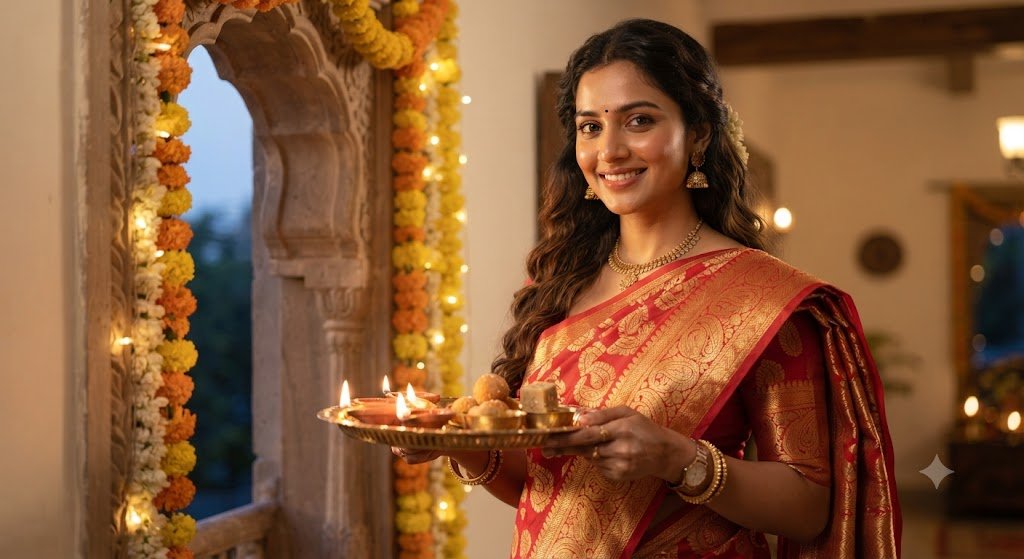
Google Gemini AI can generate or edit images based on detailed text instructions. By describing your outfit, pose, lighting, background, and photography style, you can guide the AI toward the look you want. You can also use a suitable reference photo when the image-editing feature supports it.
In this article, you will find 10 Diwali AI photo prompts for 2026, including traditional portraits, diya photography, festive outfits, family celebrations, and cinematic night scenes. These prompts are designed to help you create personalized festive images while keeping the results natural and realistic.
What Are Diwali Gemini AI Photo Prompts?
Diwali Gemini AI photo prompts are written instructions that describe the image you want Gemini to create or edit. A prompt can include details about clothing, facial expression, pose, background, lighting, camera perspective, and overall atmosphere.
For example, instead of writing only “Diwali photo,” you could describe a person wearing a traditional Indian outfit, standing beside a row of glowing diyas, with warm golden lighting and a decorated home in the background.
More specific instructions can help the AI understand your creative idea. However, results vary depending on the prompt, the reference image, and the image-generation or editing features available to your account.
How to Use Gemini AI for Diwali Photo Editing
Follow these simple steps to try the prompts below.
- Open Google Gemini and sign in to your account.
- Open the image-generation or image-editing feature available to you.
- If you want to edit your own photo, upload a suitable reference image when the feature allows it.
- Copy one of the Diwali Gemini AI photo prompts from this article.
- Paste the prompt into the chat and adjust details such as clothing, pose, or background.
- Review the generated result and request changes if necessary.
- Save and share the finished image if you are happy with it.
Important tip: If you want to preserve your identity in an edited photograph, explicitly ask Gemini to retain your original facial features and natural appearance. Even then, the result may change some details, so check the image carefully.
10 Best Diwali Gemini AI Photo Prompts 2026
Below are 10 detailed prompts for different Diwali photography styles. Replace the clothing, setting, and other details to suit your preferences.
1. Realistic Traditional Diwali Portrait
Prompt:
"Create a photorealistic festive portrait of the person in the uploaded reference photo celebrating Diwali 2026. Dress the person in an elegant traditional Indian outfit with detailed fabric texture and tasteful festive accessories. Place them in a beautifully decorated home with glowing clay diyas, subtle marigold garlands, and a colorful rangoli. Use warm, natural-looking light, realistic skin texture, balanced colors, and professional portrait photography. Preserve the person's original facial identity and natural facial features as closely as possible. Avoid excessive skin smoothing, artificial facial changes, and cartoon-like effects."This prompt is ideal for anyone who wants a classic Diwali portrait. The traditional setting and warm lighting create a festive atmosphere without making the image look overly artificial.
2. Diwali Diya Photography Portrait
Prompt:
"Edit the reference photo into a realistic Diwali diya portrait. Show the person sitting comfortably beside a row of traditional clay oil lamps arranged around a colorful rangoli. Use the gentle glow of the diyas to illuminate the scene naturally. Keep the background softly blurred, with a few decorative lights and subtle festive details. Maintain realistic skin texture, accurate hands, natural shadows, and a balanced photographic composition. Preserve the person's original face and recognizable appearance."This prompt works well for close-up portraits and festive profile pictures. The diya lighting adds warmth and makes the photograph feel intimate and traditional.
3. Luxury Diwali Fashion Photography
Prompt:
"Create a premium Diwali fashion photograph using the uploaded reference image. Dress the person in an elegant Indian festive outfit with realistic embroidery, detailed fabric folds, and coordinated accessories. Set the scene in a sophisticated home decorated with brass lamps, marigold flowers, and warm golden fairy lights. Use professional fashion photography, soft directional lighting, realistic colors, and a natural pose. Preserve the person's original facial features and proportions. Keep the styling elegant rather than exaggerated."Choose this prompt if you want a polished festive photograph suitable for social media. You can replace the outfit description with a silk saree, embroidered kurta, lehenga, or another traditional style.
4. Diwali Rangoli Portrait
Prompt:
"Create a photorealistic Diwali portrait featuring the person in the reference image standing beside a beautifully designed traditional rangoli. Include colorful geometric patterns, flower petals, small clay diyas, and a clean Indian home entrance. Dress the person in festive traditional clothing that complements the rangoli colors. Use natural-looking evening light, realistic shadows, detailed textures, and a balanced composition. Preserve the person's original face and avoid unrealistic body proportions."This idea combines traditional Diwali decorations with a simple portrait. It is particularly suitable for images where the rangoli is an important part of the composition.
5. Diwali Night Portrait With Fairy Lights
Prompt:
"Transform the reference photo into a realistic Diwali night portrait. Place the person in a festive outdoor or balcony setting decorated with warm fairy lights, glowing diyas, and tasteful Indian decorations. Use a natural evening atmosphere with soft golden highlights and gentle background bokeh. Keep the person's face clearly visible, with realistic skin texture and natural expression. Use professional low-light photography and preserve the original facial identity as closely as possible."The fairy-light background gives the image a cinematic appearance while keeping the main subject prominent. You can also request a vertical portrait for social media.
6. Traditional Indian Outfit Diwali Photo
Prompt:
"Create a realistic full-length Diwali festival photograph based on the uploaded reference photo. Dress the person in a traditional Indian outfit with authentic fabric texture, natural folds, and carefully coordinated accessories. Place them beside a decorated doorway with marigold garlands, brass lamps, and glowing diyas. Use soft festive lighting and realistic architectural details. Preserve the original face, natural body proportions, and believable posture. Avoid excessive retouching and artificial-looking details."This prompt is suitable for people who want to showcase their traditional festive look rather than focus only on a close-up portrait.
7. Cozy Home Diwali Celebration
Prompt:
"Create a warm, photorealistic image of the person in the reference photo celebrating Diwali at home. Include a comfortable living room decorated with small diyas, marigold flowers, tasteful festive ornaments, and warm string lights. Dress the person in elegant traditional clothing and give them a relaxed, natural expression. Use realistic indoor lighting, accurate shadows, and a candid photography style. Preserve the person's recognizable facial features and keep the scene authentic and welcoming."This prompt creates a more personal and natural festive scene. It is a good choice for people who prefer home celebrations over elaborate photoshoot settings.
8. Cinematic Diwali Festival Portrait
Prompt:
"Create a cinematic yet photorealistic Diwali portrait using the reference photo. Place the person in a beautiful festive environment with glowing lamps, subtle golden lights, and a decorated Indian courtyard. Use carefully balanced highlights, soft background bokeh, realistic shadows, and natural skin tones. The person should have a confident but relaxed pose and wear elegant festive clothing. Preserve the original face and avoid dramatic changes to facial structure. The final image should resemble a professional festival photograph rather than a digital painting."This style is suitable for users who like dramatic lighting but still want their images to look like photographs.
9. Minimalist Diwali Portrait
Prompt:
"Create a clean, photorealistic Diwali portrait with a simple and elegant background. Show the person in traditional Indian festive clothing, standing near a small arrangement of clay diyas and fresh flowers. Use soft warm lighting, a neutral background, natural skin texture, and a relaxed pose. Keep the composition uncluttered and focus attention on the person. Preserve the original facial features and avoid artificial beauty filters."Minimalist festive photographs can be useful for profile pictures and posts where you want a simple, refined appearance.
10. Diwali Family Celebration Portrait
Prompt:
"Create a realistic family Diwali celebration portrait using the uploaded reference photos, if supported. Show the family wearing coordinated traditional Indian festive outfits in a beautifully decorated home. Include glowing diyas, marigold garlands, colorful rangoli, and warm decorative lights. Arrange everyone in natural poses with comfortable expressions. Preserve each person's recognizable facial features as closely as possible, maintain realistic body proportions, and avoid merging faces or creating extra fingers. Use professional family photography with natural colors and balanced lighting."This prompt is ideal for creating a family-themed festive image. If you are using multiple reference photos, identify each person clearly and review the final image to check for unwanted facial changes.
Tips for More Realistic Gemini AI Diwali Photos
A good prompt includes more than a description of the festival. Use these practical suggestions to improve your results.
Describe the lighting: Mention soft evening light, warm diya illumination, or natural indoor lighting instead of simply asking for a beautiful picture.
Specify the photography style: Terms such as realistic portrait photography, full-length fashion photography, and candid festival photography help communicate your intended composition.
Keep facial instructions clear: If editing your own photograph, ask the AI to preserve the original facial identity and natural skin texture.
Avoid too many competing details: A prompt that includes dozens of decorations, multiple outfits, and several lighting styles may produce an inconsistent result. Start with a clear idea and add details gradually.
Check hands and accessories: AI-generated images can contain distorted fingers, unusual jewellery, or inconsistent clothing details. Inspect the final image before posting it.
Choose the right format: A vertical composition may work well for Instagram Stories and Reels covers, while a square crop can suit profile pictures. Always check how the image looks after cropping.
Frequently Asked Questions
1. Can I use Gemini AI to create Diwali photos in 2026?
You can use the image-generation or image-editing features available in Google Gemini to create festive images, subject to current feature availability and account access.
2. How do I make my Diwali AI photo look realistic?
Describe the lighting, clothing, background, pose, and photography style in detail. If you are editing a reference photo, ask the AI to preserve the person’s original facial features and natural skin texture.
3. Can I use my own photo with these prompts?
Yes, if the Gemini image-editing feature available to you supports uploading a reference photo. Review the generated result because facial features or other details may change.
4. Which Diwali prompt is best for Instagram?
Traditional portraits, diya photography, festive fashion images, and fairy-light portraits are useful options. Choose the style that matches your intended post.
5. Are these Diwali Gemini AI photo prompts free to use?
The text prompts in this article can be copied and adapted. However, access to Gemini’s image features and any usage limits depend on Google’s current service terms and your account.
Conclusion
These 10 best Diwali Gemini AI photo prompts for 2026 provide a starting point for creating festive portraits, traditional outfit photos, diya scenes, family images, and cinematic festival photographs. You can customize each prompt with your preferred clothing, background, pose, and lighting to create a more personal result.
For the most natural-looking images, start with a clear prompt, avoid excessive effects, and carefully review the finished photograph. If you are editing your own photo, include instructions to preserve your original facial features, while remembering that AI tools may not reproduce every detail perfectly.
Explore different festive styles and choose the images that best represent your Diwali celebration.