
Diwali is a wonderful occasion to wear a beautiful saree and capture photographs that celebrate traditional Indian fashion. From elegant silk sarees to classic red-and-white styles, sarees offer many possibilities for festive photography.
If you want to experiment with different saree styles, Diwali saree look AI photo prompts for Gemini AI 2026 can help you create personalized festive portraits. With detailed text instructions, you can describe the saree colour, fabric, border, jewellery, background, pose, and lighting.
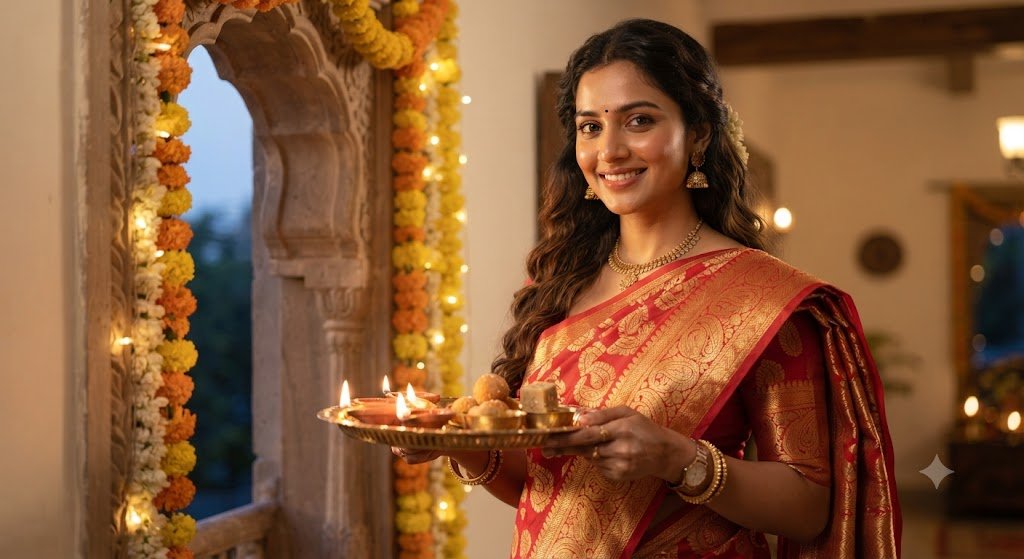
Google Gemini’s image-generation and editing features may support these creative tasks depending on the features available to your account. You can try the prompts below with a reference photo if image uploads are supported.
This article includes 10 saree photo prompts, practical editing tips, and answers to frequently asked questions.
Why Choose Saree Photography for Diwali?
The saree is a versatile traditional outfit that can create a range of festive looks. A silk saree with gold detailing may suit an elegant portrait, while a simple cotton saree can create a more understated appearance.
Diwali decorations such as diyas, rangoli, marigold flowers, and warm lights can complement the saree without distracting from it.
When using AI image tools, specify the fabric, colour, draping style, accessories, and background. These details help communicate the intended look, although the generated result may not reproduce every detail accurately.
How to Use Gemini AI Saree Photo Prompts
- Open Google Gemini and sign in.
- Select an available image-generation or image-editing feature.
- Upload a reference photo if supported.
- Copy your chosen saree prompt.
- Customize the saree colour, fabric, jewellery, and background.
- Review the output for realistic draping and facial details.
- Save the image if you are satisfied with the result.
10 Best Diwali Saree Look AI Photo Prompts for Gemini AI 2026
1. Classic Red Saree Diwali Portrait
Prompt:
"Create a photorealistic Diwali portrait of the person in the uploaded reference image wearing a traditional red saree with realistic fabric texture, natural pleats, and tasteful gold jewellery. Place the person near a decorated doorway with glowing clay diyas and marigold garlands. Use warm natural lighting, realistic shadows, and professional portrait photography. Preserve the person's recognizable facial features and keep the saree draping natural."This prompt creates a classic festive saree look.
2. Elegant Silk Saree Portrait
Prompt:
"Transform the reference photo into a premium Diwali fashion portrait featuring an elegant silk saree with a detailed traditional border and realistic fabric sheen. Add tasteful jewellery and a neatly arranged pallu. Use a decorated Indian home with brass lamps, flowers, and warm fairy lights as the background. Apply realistic skin texture, balanced lighting, and professional fashion photography. Preserve the original facial features."This style is suitable for people who prefer an elegant traditional appearance.
3. Bengali Red-and-White Saree Look
Prompt:
"Create a realistic Bengali-inspired Diwali portrait of the person in the reference photo wearing a traditional red-and-white Bengali saree with tasteful gold jewellery. Use natural pleats, realistic fabric details, and an elegant drape. Place the person near clay diyas, marigold flowers, and a colourful rangoli. Use warm lighting and natural skin texture. Preserve the person's recognizable facial features as closely as possible."This prompt is useful for a Bengali traditional look.
4. Black Saree Festive Fashion
Prompt:
"Create a realistic Diwali fashion photograph featuring the person in the uploaded reference image wearing an elegant black saree with a subtle traditional border. Add tasteful jewellery and realistic fabric folds. Place the subject in a festive interior with warm golden lights and brass lamps. Use professional portrait photography, natural skin tones, and balanced highlights. Preserve the original facial features and avoid excessive retouching."This prompt suits a sophisticated dark-coloured festive outfit.
5. Pastel Saree Diwali Portrait
Prompt:
"Create a soft, photorealistic Diwali portrait of the person wearing a pastel-coloured saree with delicate fabric details and coordinated jewellery. Use a decorated home background with warm fairy lights, flowers, and small clay diyas. Apply gentle lighting, natural skin texture, and realistic colours. Preserve the person's recognizable facial features and keep the styling elegant and understated."This style works well for people who prefer subtle colours.
6. Luxury Saree Fashion Photography
Prompt:
"Create a premium traditional fashion photograph based on the reference image. Dress the person in a luxurious saree with detailed embroidery, a realistic border, natural pleats, and tasteful accessories. Use a sophisticated festive interior with brass lamps, flowers, and warm golden lighting. Apply professional fashion photography and realistic fabric texture. Preserve the original facial features and natural body proportions."This prompt focuses on the saree as the main element of the photograph.
7. Full-Length Saree Portrait
Prompt:
"Create a photorealistic full-length Diwali portrait of the person in the reference photo wearing a traditional Indian saree. Show the complete saree drape, natural pleats, pallu, and coordinated footwear where visible. Place the person in a decorated courtyard with rangoli, clay diyas, and marigold flowers. Use realistic body proportions, balanced lighting, and natural fabric movement. Preserve the person's recognizable facial features."This prompt is useful for showcasing the entire outfit.
8. Saree Portrait With Diyas
Prompt:
"Create a realistic festive portrait of the person in the reference image wearing an elegant saree and standing beside a row of glowing clay diyas. Use warm light from the lamps, realistic shadows, and a softly blurred background. Include subtle festive flowers and traditional decorations. Preserve the person's original facial features and make sure the saree folds, hands, and lamps look natural."This style combines traditional fashion with diya photography.
9. Saree Mirror Selfie
Prompt:
"Create a realistic full-length Diwali mirror selfie based on the reference image. Show the person wearing a beautiful traditional saree with natural pleats, a neatly arranged pallu, and tasteful jewellery. Use a clean room with warm fairy lights and subtle festive decorations. Ensure realistic mirror reflections, natural body proportions, and accurate clothing folds. Preserve the person's recognizable facial features and make the phone and hands look natural."This prompt is suitable for showing a saree outfit in a casual style.
10. Cinematic Golden-Light Saree Portrait
Prompt:
"Create a cinematic yet photorealistic Diwali portrait of the person wearing an elegant traditional saree with realistic fabric texture and coordinated jewellery. Place the subject in a decorated Indian courtyard with glowing diyas, flowers, and warm golden lights. Use soft highlights, natural shadows, realistic skin texture, and professional portrait photography. Preserve the original facial features and avoid excessive glow or artificial effects."This prompt combines traditional saree fashion with an atmospheric festive setting.
Tips for Realistic Saree AI Photos
Describe the fabric: Specify silk, cotton, chiffon, or another fabric to guide the intended look.
Explain the draping style: Ask for natural pleats and a neatly arranged pallu. AI-generated sarees may otherwise have inconsistent folds.
Choose jewellery carefully: Tasteful accessories can complement the saree without making the portrait too crowded.
Keep the pose natural: Standing, sitting, and gentle three-quarter poses can all work well for saree photography.
Review the final image: Check the fabric border, pleats, jewellery, hands, and facial details before saving.
Frequently Asked Questions
Can Gemini AI create saree photos for Diwali?
You can try the available Gemini image-generation or editing features with the prompts in this article. Results depend on your account’s available features.
Which saree colour is best for Diwali photography?
Red, gold, green, black, and pastel shades are all possible choices. The best colour depends on your personal style and the background.
How do I create a realistic Bengali saree look?
Describe the red-and-white saree, traditional jewellery, natural draping, and appropriate festive decorations. Review the result for accuracy.
Can I change the saree in my existing photograph?
You can try doing so if the available image-editing feature supports reference-photo uploads and outfit editing. Results may vary.
Conclusion
These best Diwali saree look AI photo prompts for Gemini AI 2026 provide ideas for red sarees, silk sarees, Bengali traditional styles, mirror selfies, and full-length festive portraits.
Customize the prompts with your preferred fabric, colour, jewellery, and background. For a natural-looking result, focus on realistic draping, balanced lighting, and accurate facial details.