
Diwali is a festival of lights, traditions, family gatherings, and beautiful decorations. Every year, people share festive photographs featuring traditional outfits, glowing diyas, colorful rangoli, and warm family moments. If you want to create a new festive look for your social media posts, Diwali photo prompts for Gemini AI 2026 can help you explore different photographic styles.
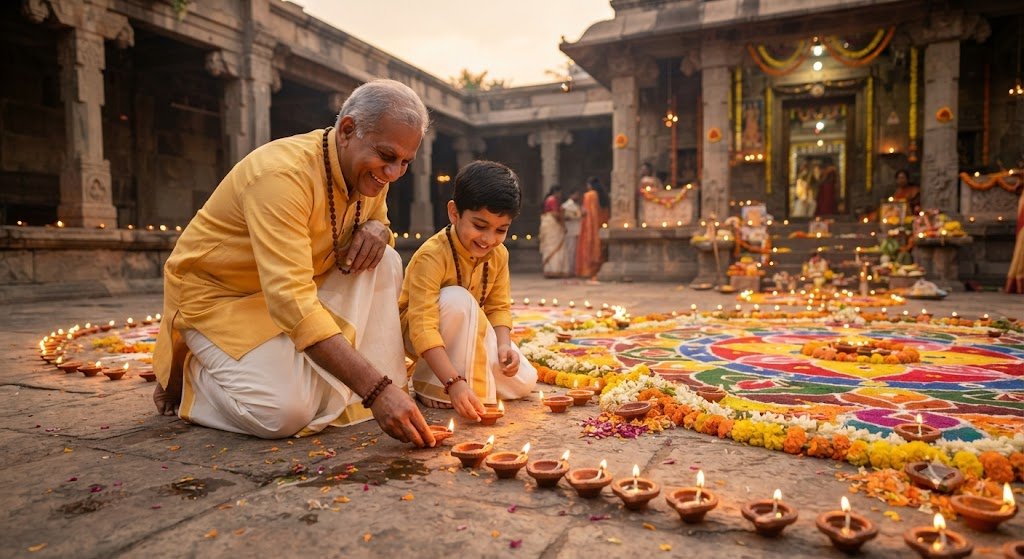
AI image tools allow you to describe a scene in ordinary language and use those instructions to generate or edit an image. Instead of arranging a complete photoshoot, you can experiment with a traditional portrait, an elegant outfit, a diya scene, or a cinematic festive background. The final result depends on the instructions, reference image, and features available in the tool you use.
This article includes 15 Diwali photo prompts covering different styles for men, women, couples, and families. Each prompt can be customized to match your preferred outfit, lighting, pose, and background.
What Makes a Good Diwali AI Photo Prompt?
A good prompt describes the image clearly. It should explain who or what appears in the picture, what the subject is wearing, where the scene takes place, how the lighting looks, and what photography style you prefer.
For example, “Create a Diwali picture” is a broad instruction. A more detailed prompt might describe a traditional portrait beside glowing clay diyas, with a colorful rangoli, warm evening lighting, realistic fabric details, and natural skin texture.
You can improve your prompts by including these elements:
- Subject: One person, a couple, or a family.
- Clothing: Saree, kurta, lehenga, or another festive outfit.
- Background: Home entrance, courtyard, balcony, or decorated living room.
- Lighting: Warm diya light, soft indoor lighting, or evening fairy lights.
- Photography style: Close-up portrait, full-length fashion photograph, or candid scene.
- Identity instructions: If editing a reference photo, ask the tool to preserve recognizable facial features.
How to Use These Diwali Prompts in Gemini AI
- Open Google Gemini and sign in to your account.
- Choose an image-generation or image-editing feature available to you.
- Upload a reference image if you want to edit an existing photo and the feature supports it.
- Copy the prompt that matches your preferred style.
- Paste it into Gemini and adjust the details.
- Review the generated image and request changes if necessary.
- Save the final image if you are satisfied with the result.
If you are editing a real photograph, check the final output carefully. AI image tools can alter faces, hands, clothing, and small background details even when you ask them not to.
15 Trending Diwali Photo Prompts for Gemini AI 2026
1. Classic Diwali Traditional Portrait
Prompt:
"Create a photorealistic Diwali 2026 portrait of the person in the uploaded reference image. Dress them in elegant traditional Indian festive clothing with realistic fabric texture and tasteful accessories. Place them beside glowing clay diyas and a colorful rangoli in a decorated home entrance. Use warm natural lighting, realistic shadows, and a relaxed expression. Preserve the person's original facial features as closely as possible and avoid artificial skin smoothing."This is a versatile choice for anyone who wants a timeless festive photograph.
2. Diwali Saree Fashion Photography
Prompt:
"Transform the reference photo into a realistic traditional Diwali fashion portrait. Dress the person in a beautiful Indian saree with natural pleats, detailed fabric texture, and coordinated jewellery. Set the scene in an elegant festive interior with marigold garlands, brass lamps, and warm decorative lights. Use professional portrait photography and natural skin tones. Preserve the original face and keep the styling realistic."This prompt is suitable for a traditional fashion-focused image.
3. Stylish Men’s Kurta Look
Prompt:
"Create a realistic festive portrait of the person in the reference image wearing a well-fitted traditional Indian kurta with subtle embroidery. Use a decorated home entrance with clay diyas, marigold flowers, and warm lights as the background. Give the person a relaxed, confident pose. Use realistic fabric folds, natural skin texture, and balanced lighting. Preserve the person's recognizable facial features and natural proportions."This style is useful for a simple and elegant men’s Diwali portrait.
4. Romantic Diwali Couple Portrait
Prompt:
"Create a romantic but natural Diwali couple photograph using the uploaded reference images, if supported. Show the couple in coordinated traditional Indian outfits, standing together beside glowing diyas and tasteful festive decorations. Use warm evening lighting, natural expressions, realistic skin texture, and professional portrait photography. Preserve both people's recognizable facial features as closely as possible. Keep the pose comfortable and avoid unnatural hands or exaggerated romantic effects."This prompt is suitable for couples who want a festive photograph that feels personal and natural.
5. Diwali Night Fairy-Light Portrait
Prompt:
"Create a photorealistic Diwali night portrait using the reference photo. Place the person in a festive outdoor setting with warm fairy lights, clay lamps, and a softly blurred background. Use balanced low-light photography, gentle golden highlights, and natural shadows. Keep the face clearly visible and preserve the person's original facial features as closely as possible. Avoid excessive glow and artificial skin texture."This style emphasizes festive night lighting while keeping the subject easy to see.
6. Diya-Holding Close-Up Photo
Prompt:
"Create a realistic close-up festive portrait of the person in the uploaded photo holding a small traditional clay diya. Use the lamp's warm glow as a gentle light source and add a softly blurred background with festive decorations. Keep the face natural, the hands anatomically correct, and the flame realistic. Preserve the original facial features and use professional portrait photography with balanced colors."This is a good choice for a close-up photograph with a strong Diwali theme.
7. Colorful Rangoli Photography
Prompt:
"Create a realistic Diwali photograph featuring the person standing beside a beautiful traditional rangoli made with colorful powders and flower petals. Arrange a few clay diyas around the rangoli and add subtle festive decorations to the background. Dress the person in traditional Indian clothing. Use natural evening lighting, realistic textures, and a balanced full-length composition. Preserve the original face and natural body proportions."This prompt gives the rangoli an important role in the final image.
8. Luxury Diwali Fashion Portrait
Prompt:
"Create an elegant, photorealistic Diwali fashion photograph based on the reference image. Dress the person in a premium traditional Indian outfit with detailed embroidery and tasteful accessories. Set the scene in a sophisticated room decorated with brass lamps, fresh flowers, and warm golden lights. Use professional fashion photography, realistic shadows, and natural skin tones. Preserve the person's recognizable face and avoid exaggerated retouching."This style is suitable for users who prefer a polished, editorial appearance.
9. Cozy Family Diwali Celebration
Prompt:
"Create a warm and realistic family Diwali photograph using the uploaded reference photos, if supported. Show the family in coordinated festive Indian outfits inside a decorated home with diyas, marigold garlands, and colorful decorations. Use natural smiles, comfortable poses, realistic lighting, and accurate facial features. Keep each person distinct and avoid merging faces or generating extra fingers. Use the style of a professional family photographer."This prompt is ideal for a family-themed festive image.
10. Diwali Balcony Portrait
Prompt:
"Transform the reference photo into a realistic Diwali balcony portrait. Dress the person in elegant traditional clothing and place them on a balcony decorated with warm fairy lights, small diyas, and tasteful festive ornaments. Add a softly blurred evening background and natural shadows. Use realistic portrait photography and preserve the person's original facial identity as closely as possible. Avoid unrealistic city lights or excessive decorative effects."A balcony setting can create an attractive evening atmosphere without requiring a crowded background.
11. Minimalist Diwali Portrait
Prompt:
"Create a clean and photorealistic Diwali portrait of the person in the reference image. Use traditional festive clothing, a neutral background, and a small arrangement of clay diyas and fresh flowers. Keep the composition simple and elegant, with natural skin texture, soft lighting, and realistic colors. Preserve the original facial features and avoid excessive filters, artificial glow, or unnecessary decorations."This prompt works well for people who prefer a simple profile-picture style.
12. Cinematic Diwali Courtyard Photo
Prompt:
"Create a cinematic but realistic Diwali photograph using the uploaded reference photo. Place the person in a traditional Indian courtyard decorated with clay diyas, marigold flowers, and warm lights. Use balanced golden highlights, natural shadows, realistic fabric details, and a slightly blurred background. Keep the face clear and preserve the person's recognizable appearance. Make the image look like a professional photograph rather than a digital painting."This prompt creates a dramatic festive setting without relying on exaggerated effects.
13. Traditional Lehenga Festive Portrait
Prompt:
"Create a realistic Diwali fashion portrait of the person in the reference image wearing an elegant traditional lehenga with detailed embroidery and natural fabric folds. Add coordinated jewellery and place the subject in a decorated Indian home with warm fairy lights, flowers, and clay diyas. Use professional fashion photography, natural skin texture, and balanced lighting. Preserve the original facial features and avoid unrealistic body proportions."This is suitable for users who want to explore a traditional festive outfit.
14. Candid Diwali Celebration Photo
Prompt:
"Create a candid, photorealistic Diwali celebration photograph based on the reference image. Show the person enjoying a festive moment at home, such as arranging diyas beside a colorful rangoli. Dress them in comfortable traditional Indian clothing and use warm indoor lighting with realistic shadows. Keep the pose natural and the expression relaxed. Preserve the person's original face as closely as possible and avoid an overly staged composition."A candid-style prompt can produce a more relaxed atmosphere than a formal portrait.
15. Instagram-Ready Diwali Portrait
Prompt:
"Create a polished, photorealistic Diwali portrait suitable for an Instagram post. Show the person wearing elegant festive clothing in a decorated setting with glowing diyas, warm fairy lights, and subtle floral details. Use a vertical composition, natural expression, realistic skin texture, and professional portrait photography. Keep the face clearly visible and preserve the person's recognizable features as closely as possible. Leave enough space around the subject for flexible cropping."This prompt is designed for social media presentation. Always check the final image crop before posting.
Tips for Better Diwali AI Photos
Write Clear and Detailed Prompts
Include the subject, clothing, setting, lighting, and photography style. Specific instructions are usually more useful than general requests.
Preserve Facial Identity When Editing
If you upload your own image, ask the AI to retain your original facial features. However, AI tools may still change details, so compare the result with your source photograph.
Use Natural Lighting Descriptions
Terms such as soft evening light, warm diya illumination, and balanced portrait lighting help describe the atmosphere you want.
Avoid Overloading the Background
Too many decorations can make an image look crowded. Start with a few key festive elements and add more only if needed.
Check the Final Result
Review faces, hands, jewellery, clothing details, and background objects. If something looks incorrect, try a follow-up instruction or simplify the prompt.
Frequently Asked Questions
Can I use these Diwali prompts in Gemini AI?
You can try them with the image-generation and image-editing features available to your Gemini account. Feature availability and results can vary.
Which Diwali prompt is best for Instagram?
Traditional portraits, festive fashion images, diya close-ups, and fairy-light scenes are useful options. Select a style that fits the kind of post you want to create.
Can I use these prompts with my own photo?
Yes, if your chosen image-editing feature supports reference-photo uploads. Ask the AI to preserve your original appearance, then inspect the result for changes.
How do I create realistic Diwali AI photographs?
Describe natural lighting, realistic clothing textures, believable poses, and accurate facial features. Avoid excessive visual effects and check the output carefully.
Can I customize these prompts?
Yes. You can change outfit colors, backgrounds, decorations, lighting, and composition to suit your preferences.
Conclusion
These 15 trending Diwali photo prompts for Gemini AI 2026 cover a variety of festive styles, from traditional portraits and saree photography to family celebrations, diya close-ups, and cinematic night scenes.
Choose a prompt that matches your idea, personalize the details, and refine the output with clear instructions. For the best results, focus on natural lighting, realistic clothing, simple compositions, and careful image review.
With these prompts, you have a starting point for creating personalized Diwali images to celebrate the festival and share your festive creativity online.